Merge into one file
Photos, PDFs and iPhone HEIC pictures go into one PDF in the order you choose. Skip pages you don't need.
For visa, job, school and bank applications
DocuClue puts your photos and PDFs into one file, shrinks it under the portal's size limit and names it the way the form asks. It all happens in your browser, so your passport scan never gets uploaded anywhere.
No sign up. Works in Chrome, Edge, Safari and Firefox on computers and phones.
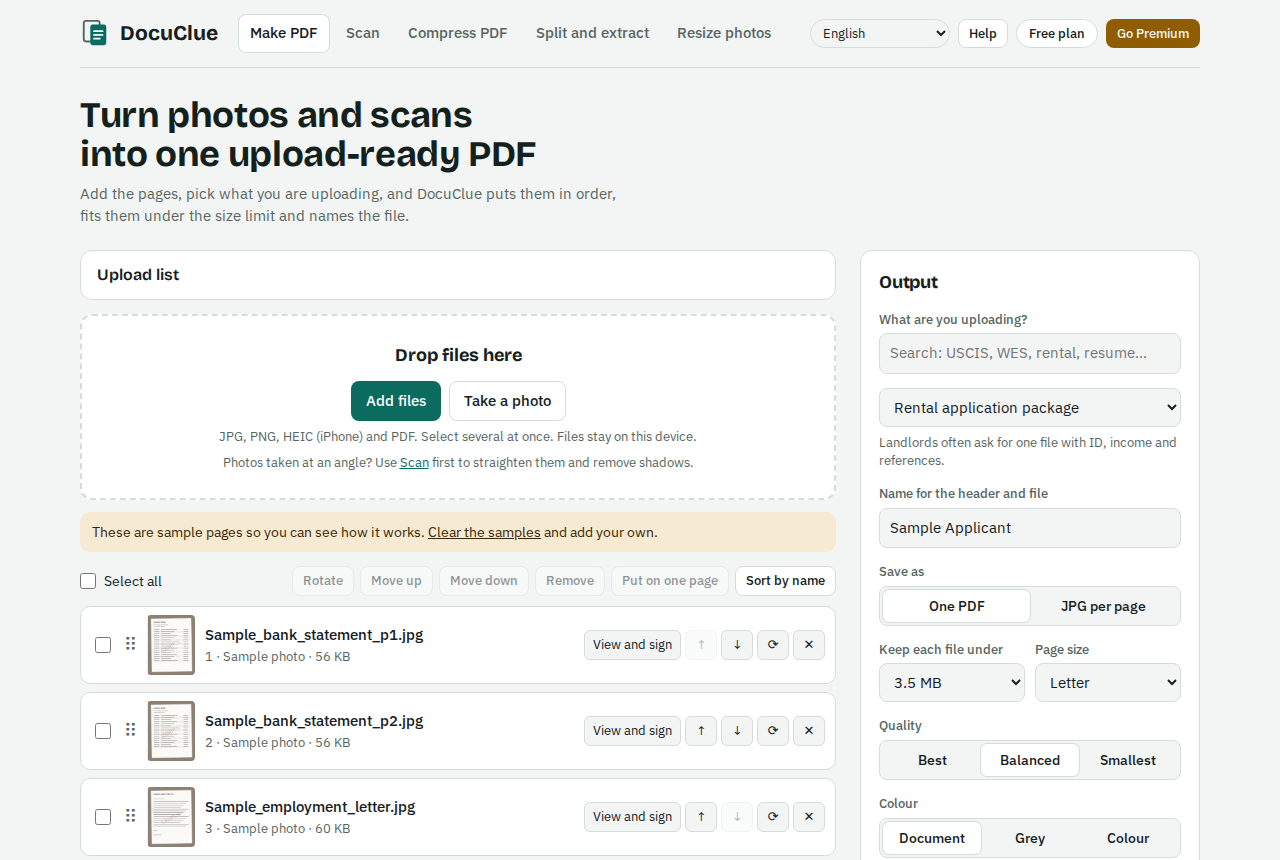
Search for the portal or document, like "IRCC passport" or "UCAS transcript". The size limit, page size and file name fill in for you. You can change any of them.
Drop in photos, scans or PDFs, or scan with your phone. Drag to reorder, rotate a page, put both sides of an ID card on one page, sign where you need to.
DocuClue tries quality levels until the file fits, then saves one clean PDF. It tells you the final size before you hand it over.
Built around the stuff that goes wrong at 11pm the night before a deadline.
Photos, PDFs and iPhone HEIC pictures go into one PDF in the order you choose. Skip pages you don't need.
Set 2 MB, 4 MB or whatever the portal says. You get the sharpest file that still fits, not a blurry one to be safe.
Point the camera at a page. DocuClue finds the edges, flattens the angle and cleans it up so it reads like a scanner copy.
Draw or type a signature, add today's date, your name or a check mark. Fill in PDF forms that have boxes.
Resize a photo to exact pixels and a KB range, for forms that ask for 600 x 600 under 240 KB and nothing else.
Shrink a PDF someone sent you, or pull out the pages a form actually wants.
Keep your name and the rules for each portal you use, so the next upload takes seconds.
Turn scans into text you can search and copy, and lock a PDF with a password before you email it.
Presets follow each site's published upload rules. If a site changes its limit, you can change it too.
IRCC (Canada), USCIS (US), UK visas, ImmiAccount (Australia), Indian e-Visa, Nigeria Immigration Service, Schengen visa centres, Thailand and Japan e-Visas.
Transcripts, degree certificates and translations for WES, UCAS and university portals. Exam photos and signatures sized for Indian exam forms.
CV, cover letter and certificates as one tidy PDF for Workday, Indeed and company career pages.
ID, pay slips and references in one file for a landlord or letting agent.
Statements and receipts in date order, with account numbers blacked out where you don't need to share them.
Tax portals, benefits, clinic forms, invoices, contracts and company registrations.
DocuClue is an independent tool. It is not affiliated with or endorsed by any government agency, school or company named here. Always check the portal's own instructions before you submit.
Most free PDF sites upload your file to their server to process it. DocuClue doesn't. The work happens inside your browser tab, and when you close it, it's gone.
Everything on the Free plan is ready to use now. Premium and Pro open soon, and the waitlist gets told first.
$0
$17.99 a year
or $2.99 a month
$29.99 a year
or $4.99 a month
The app speaks 20 languages, and it picks yours from your browser. You can switch any time from the menu.
Yes. No trial, no card, no watermark on your file. You can make 5 PDFs a day with up to 20 pages each. Paid plans will add higher limits and extra tools for people who do this a lot.
No. Your files are opened and processed by your own browser. They are not uploaded to our servers, so there is nothing for us to keep. The privacy policy has the details.
DocuClue follows the limits each portal publishes, like file type, size and page count, and shows you the final size before you download. Rules change, though, so give the portal's instructions a quick look before you submit.
Yes. Open the app in your phone's browser and you can scan pages with the camera, merge them and download the PDF. You can also add it to your home screen. iPhone and Android apps are in the works.
Yes. HEIC photos are converted for you, and sideways pictures can be turned with one tap.
A one time payment for 30 days of Pro. It's meant for someone putting together one big application, like a visa or university admission, who doesn't want a subscription.
Send us a message or email hello@docuclue.com. A real person reads every one.